
Inhale
The reverse-reverb vocal riser, in one step.
- Instant download
- 3 activations
- Free updates
- 14-day refund
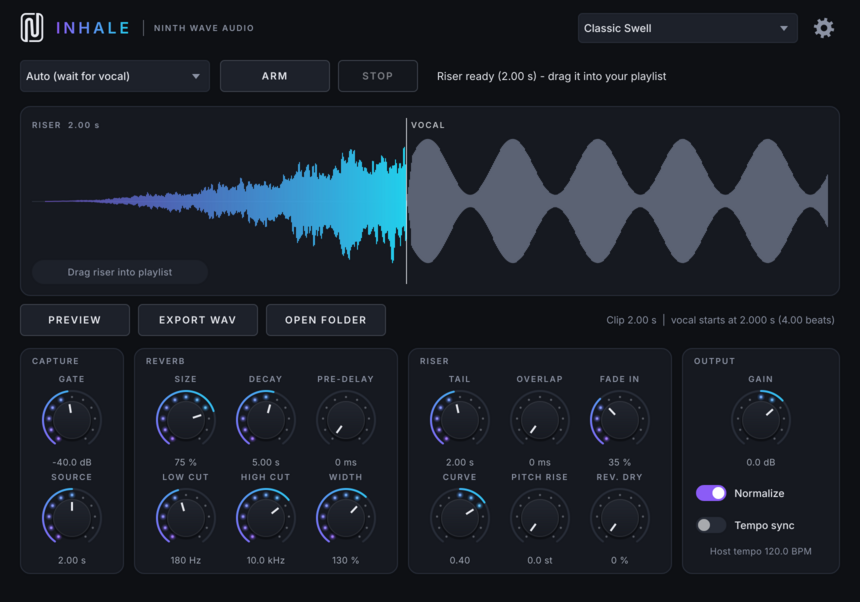
Inhale captures the first phrase of your vocal and renders the classic reverse-reverb swell that sucks into it, ending exactly where the vocal starts. Drag it straight into your playlist.
No more bouncing a reversed vocal through a reverb, cutting it, reversing it again and lining it up by hand.
One-step riser
Capture the vocal and the swell renders instantly. No bouncing, reversing or manual alignment.
Sample-accurate
The riser ends exactly where the vocal begins. The info line shows the offset in seconds and beats.
Drag & drop
Drag the waveform into your playlist, or export a WAV wherever you like.
Auto capture
Arm it and play the song. Recording starts when the vocal crosses the gate.
Voiced for vocals
A smooth 16-line reverb tuned so the swell carries the voice, with size, decay up to 20 s, pre-delay, filters and width.
Pitch rise & reverse dry
Tape-style pitch sweep into the vocal, plus the classic reversed-vocal effect.
Tempo sync
Source and tail lengths in note values, from 1/16 to 8 bars.
Zero latency
Audio passes through untouched. Capture and settings are saved with your project.
Scalable interface
Resize the plugin window from 75 % to 200 % to suit any screen.
How to use it
- Put Inhale on the mixer insert of your vocal track.
- Choose a capture mode. Auto: press ARM and play the song; recording starts when the vocal crosses the Gate level and stops after the Source length. Manual: press ARM to start and STOP to finish.
- The riser renders right away. The waveform shows the riser in colour, leading into your vocal in grey.
- Tweak any knob. The riser re-renders automatically after each change. Press PREVIEW to hear it leading into the vocal.
- Drag the waveform into your playlist and put the end of the clip right where the vocal starts. With Overlap, line the vocal up with the VOCAL marker instead.
Each drag also saves a WAV, by default to Documents/Ninth Wave Audio/Inhale Renders (you can choose another folder in the settings). The capture and settings are saved with your project.
Controls
Capture
- Mode
- Auto (wait for the vocal) or Manual (arm/stop).
- Gate
- Level that counts as "the vocal started". Also trims silence before the vocal.
- Source
- How much of the vocal goes into the reverb. Default 2 s (1 bar with Tempo sync); longer keeps more of the voice's character in the swell.
Reverb
- Size
- Size of the space: density and early character.
- Decay
- Reverb length, 0.3 to 20 s. Longer = a longer, smoother swell.
- Pre-Delay
- Pushes the peak of the swell earlier, leaving a gap before the vocal.
- Low Cut / High Cut
- Filters the vocal before it goes into the reverb.
- Width
- Stereo width of the riser, from mono to 200 %.
Riser
- Tail
- Length of the riser before the vocal, in seconds or note values.
- Overlap
- Lets the riser continue into the vocal, fading out.
- Fade In / Curve
- Fade at the start of the riser: length as a percentage of the tail, and shape.
- Pitch Rise
- Tape-style pitch sweep that rises into the vocal, 0 to 12 semitones.
- Rev. Dry
- Mixes in the reversed dry vocal for the classic reverse-vocal effect.
Output
- Gain / Normalize
- Normalize sets the riser's peak to -1 dBFS before Gain is applied.
- Tempo sync
- Source and Tail use note values (1/16 to 8 bars) at the host tempo.
Settings (gear button)
- Renders folder
- Choose where dragged and exported WAVs are saved, or reset to the default.
- UI scaling
- Make the interface 75 % to 200 % of its normal size.
- License
- See your license status, activate, check or deactivate this computer.
8 factory presets
Formats
- VST3
- Windows & macOS
- AU
- macOS
- AAX
- Windows & macOS (Pro Tools)
Platforms
- Windows 10/11 (64-bit)
- macOS 11 or later (Apple Silicon & Intel)
Requirements
- 64-bit DAW that supports VST3, AU or AAX
- Internet connection for one-time activation
Version 0.1.0